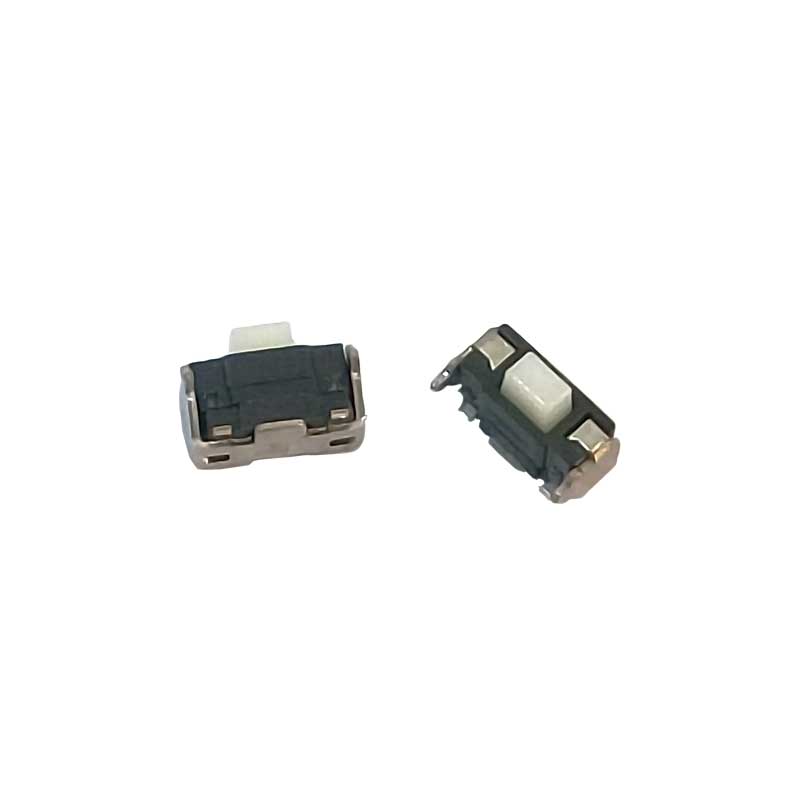
SAM S3 SMALL ON OFF SWITCH

(0 reviews)
₹7 ₹25/pcs 72% off

Small pin on/off switch for Samsung S3

 Durable metal pins for stable conductivity

Compact design – fits tight spaces on motherboard

More product details

 Ensures reliable power control on mobile circuits

 Corrosion-resistant and long-lasting

 Perfect for mobile repair technicians & DIY projects

 Tested for consistent switching and low resistance

In stock ·SKU 2821
  • Delivery Shipping calculated at checkout
  • 7-day returns Return by mail · customer pays return shipping
  • Secure payment Secure payment options

SAM S3 SMALL ON-OFF SWITCH


  1. Location: The power button is typically located on the right-hand side (when viewing the front of the device) or the top edge of the phone, depending on the specific model and variant.

  2. Functionality:

    • Pressing and holding the power button for a few seconds turns the device on or off.
    • It can also be used to lock or unlock the phone when pressed briefly.
    • Additionally, long-pressing the power button might prompt the user to access options like turning off the phone, restarting, or entering into the silent mode/vibration mode.
  3. Physical Appearance:

    • The power button on the Samsung Galaxy S3 is usually a small, tactile button that provides feedback when pressed.
  4. Importance:

    • The power button is a crucial component for operating the device and performing basic functions like powering the phone on or off, waking the screen, or initiating a restart.

SAM S3 SMALL ON OFF SWITCH 1


-

Weight

0.001 kg

Comments

Customer Reviews

No reviews yet

Be the first to review this product.

Add a review

Related Products